


Design
5 minute read
A Guide to Redesigning a Website without Losing SEO Value.
LAST UPDATED:
August 15, 2023


Knowing how to redesign a website without losing SEO is essential for any business looking to stay ahead of the competition. It can be a daunting task, but if done properly, it can make all the difference in your website’s visibility and engagement.
To help you navigate this process, this guide provides you with an easy to follow checklist with actionable steps on how to redesign a website without sacrificing your website’s search engine rankings. From making sure all content is up-to-date and optimized for keywords, to ensuring page titles are descriptive and relevant – this guide has everything you need to ensure that your redesigned site stays at the top of search engine results pages!
So don’t let fear keep you from making necessary design changes – use this guide to confidently move forward with redesigning your website and maintain or even improve its SEO!
Website Redesign Search Engine Optimization Checklist
We’ve been doing redesign projects for 10 years and counting. Here is our proven strategy for making sure the redesign process doesn’t negatively affect SEO rankings:
- Analyze your current SEO health
- Find your best-performing content
- Set new SEO goals
- Map out new content strategy
- Set up 301 redirects
- Update XML sitemap
Consult an SEO Expert
Whether you have an in-house team, or you lean on outside help, consulting an SEO specialist is the best way to ensure your website is discoverable and visible in search engine results. Your SEO team can help you identify which keywords to target (that you probably wouldn’t have thought of!), make content suggestions, and guide you through both on-page and technical SEO optimizations. Doing this will help your website rank as high as possible for relevant queries and searches, ensuring that more people can find it, helping to generate more leads or sales for your business.
Analyze Your Current Website’s SEO Health
“You can’t improve what you don’t measure.” Analyzing your current website is an essential step in improving the effectiveness of your online presence. It allows you to identify gaps in content topics, as well as what makes a page perform better than others. By assessing key metrics such as page loading time and keyword rankings, you can develop a comprehensive strategy for improving your website’s performance and visibility.
Moreover, analyzing your website also helps inform decisions regarding the design, layout, features, and other elements that can enhance user experience. All of this requires a thorough investigation that should be conducted on a regular basis to ensure that the site remains up-to-date.
Find Your Best Existing Content
When it comes to redesigning a website, make sure you don’t lose any of your existing content’s authority. This means taking the time to identify and prioritize the web pages that are performing best in search engine rankings and ensuring they remain intact throughout the redesign process.
To get started, use Google Analytics, Google Search Console, and other analytics tools to review data on queries, rankings, and other metrics. These will help you determine which content is most important to your users. You can also look at backlinks from other websites to see which pages are generating the most traffic.
Once you have identified your top-performing content, make sure it’s included in the new design with minimal changes (or, lean into it with optimization) so that it continues to rank well with search engines. Keeping your best content safe during a website redesign will ensure that you don’t lose out on any valuable SEO gains.
Set Your SEO Goals for the New Site
When developing your SEO goals, take into account factors such as keyword research, competition level and content analysis. Consider the cost-benefit of different strategies and determine what areas of emphasis will result in a better ROI (Return On Investment). Develop realistic expectations from your strategy and continuously test to see which methods are working best for you. As you progress, you can use analytics tools to measure results and refine strategies. This can help you reach specific milestones more quickly and efficiently.
Map Out New Content per Your SEO Strategy
Planning and organizing content for maximum SEO effect is essential for any website. Mapping out new content helps you to take into account all the necessary factors such as keywords, meta tags, link structure, etc., so that it can be all optimized for SEO from the onset.
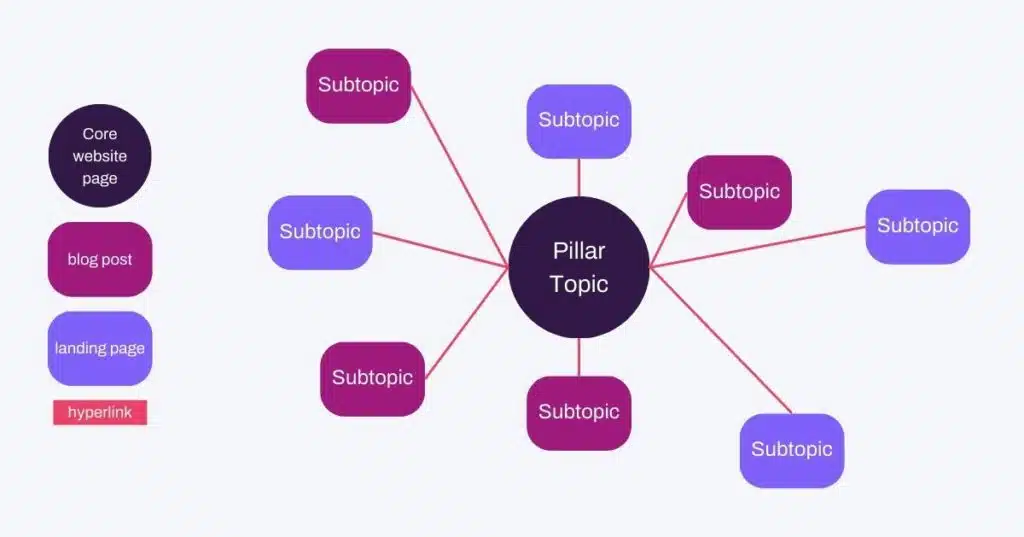
Additionally, mapping out new content gives you a better understanding of where your content sits in relation to existing topics within your industry. At Huemor, we used Hubspot’s SEO tool to organize our desired keywords into topic clusters. We selected our core pillar topics such as “website redesign agency” and then sub topics like “shopify website redesign.” This will help ensure that we’re creating high-quality content with relevance to our audience, while building a solid SEO structure.
Plan Out 301 Redirects
Now that you know what content will be on the new site, you can plan which URLs need to be redirected. A 301 redirect tells search engines that a page has been permanently moved to another URL. Implementing 301 redirects avoids broken links and makes sure users don’t get sent to a 404 error page, while also earning link equity from pages you’d like to replace or move. Also, setting up 301 redirects helps prevent duplicate content issues from appearing in search engine results, enabling the original URL to still receive traffic from external links and internal links.
Optimize Your Site’s Speed
Optimizing your page speed is essential for a successful SEO strategy. Page speed is one of the many ranking factors that search engines use to decide which pages appear in the SERP and how high they rank. A faster page load time can help improve user experience, as well as user engagement on your pages. Additionally, optimizing your page speed may also encourage more people to share your content as it will be easier and more convenient for them to do so. Faster page speeds can also decrease bounce rates and improve conversions.
Notify Search Engines by Updating Your XML Sitemap
XML sitemaps are a powerful tool to inform search engines about the structure of your website. They help search engines quickly find and index new pages on your site, as well as track changes you’ve made to existing content. Updating your XML sitemap is important to ensure that search engines are aware of any new URLs added or any changes you make to existing ones. Having an up-to-date XML sitemap can help improve your SEO and increase the chances of users finding the most relevant content on your website.
In conclusion, a website redesign can be a great opportunity to improve your SEO performance. By properly mapping out content, setting up 301 redirects, optimizing page speed, and updating your XML sitemap, you can ensure that your website remains as visible as possible while keeping your design up to date with trends and your brand.
FREE DOWNLOAD
SEO Audit Template
Get Memorable Insights.
Sign up to receive actionable web design advice directly in your inbox monthly.
Get Memorable Insights.
Sign up to receive actionable web design advice directly in your inbox monthly.

President of Huemor
Jeff Gapinski is the President of Huemor where he helps plan the long-term strategic growth of the agency. Jeff is passionate about UI/UX, demand generation, and digital strategy.
What Do You Think?
Have feedback? Maybe some questions? Whatever it is, we'd love to hear from you.
Leave a Comment
![Website Design Standards We Follow [That You Should Too!]](https://huemordev.b-cdn.net/wp-content/uploads/2021/12/2023.04.04.Website-Design-Standards-We-Follow-That-You-Should-Too.jpg.webp)



No comments found